A galaxy of your own
Give your planets their own planet map, so they never crowd the game’s galaxy, and make each one appear only once the one before it is beaten, as the game’s own planets do. This is how the example world’s Zephyra Expanse works.
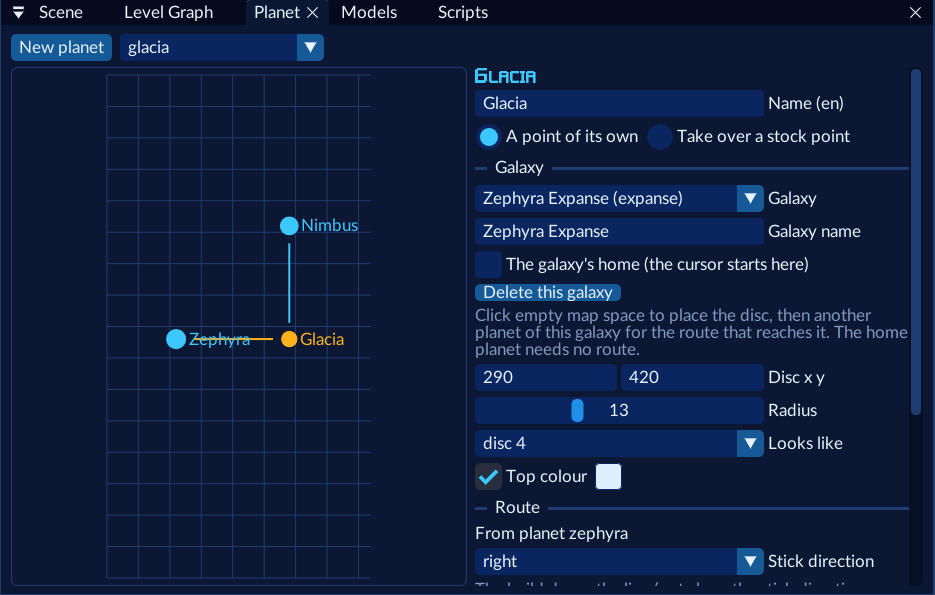
Make the first planet and its galaxy
In Planet, press New planet. Under Galaxy, choose New galaxy…. Give the galaxy a Galaxy name (it’s shown at the top of the map) and leave this planet as its home: the cursor starts there.
Place it and choose when it opens
Click the empty grid to place the disc. Set Entry level for each hero. For Opens:
| Option | The planet shows… |
|---|---|
| from the start | as soon as the pack is loaded |
| once its own level was entered | after the player first reaches its level some other way, e.g. a portal (it’s “discovered”) |
| by a trigger or script | when a trigger’s unlock planet action or jfg.unlock_planet runs |
| once another planet was entered | after the player has been to another planet |
| once another planet was completed | after another planet is completed |
The home planet should open from the start (or be discovered), or the galaxy never shows.
Add the next planet
New planet again (it joins the galaxy you’re looking at). Click the first planet to draw the route from it: only free stick directions are offered. Set Opens to once another planet was completed and After planet to the first.
Complete the first world
A planet is completed by a trigger. At the end of the first world’s last level, make a trigger: When enter
with the finish area (select objects there and press Area from the Scene’s selection), and the action
complete planet with the first planet.
Play it
Save and Play. Reach the finish: the next planet appears on the map. On the planet map, R switches to your galaxy and L back to the game’s (on a controller also RB/LB and the D-pad).
Planet regions
In the game, each planet is split into regions. Leaving a region by an exit shows the “Area Cleared” stats screen (Tribals rescued, killed and remaining, the time, then your weapons), and entering one shows its name with the planet’s and your continues. Your planets work the same way once their levels name them:
Give each level its planet
In the Level window, set Planet on every level of the planet. A planet’s levels together are one region: moving between them shows nothing; an exit to another planet’s level, or to a stock level, shows the stats screen first.
Keep the exits’ stats flag
Exits have arg1A 1 by default, as most of the game’s exits do. Set it to 0 on an exit that should leave without the stats screen.
Play it
Leave the planet: the stats screen waits for a button press, then the next level loads with the new planet’s title: the planet’s name, the galaxy’s name under it, and your continues.
Being a region brings the game’s other region rules with it:
- Continues: two each time the hero enters the planet. Dying with none left is game over.
- Restarts: after a death the hero starts again at the level where the planet was entered.
- Leaving resets the region you came from: its Tribal progress and killed squads start again when you return, as in the game. A portal out of a stock level shows that stock region’s stats screen too.
- Records: the stats screen keeps the region’s best kills and time in the save, as the game’s regions do.
The port gives mods’ regions the numbers 31–39 (the game uses 1–30; the save keeps 40), so all the mods loaded together have room for nine planets with regions. A planet can have up to 32 levels. Studio warns past either limit.
Opened, entered and completed planets are kept per save file, in saves/<save>_worlds.json next to the game’s save,
written when the game saves.
From code
jfg.complete_planet("glacia")            -- open what comes after Glacia
local open, entered, done = jfg.planet("nimbus")
jfg.show_galaxy("expanse")               -- the next time the map opens, it's on the Expanse
C mods have jfg_world_* and jfg_galaxy_*, and the events jfg_on_map_open, jfg_on_galaxy_change and
jfg_on_planet_select (C API).
On the game’s galaxy instead
Leave Galaxy on the game’s galaxy, click a stock planet to route from, and pick with the stock point its route leaves: your planet shows once the player has that stock planet. If another pack already uses that direction from that planet, the port moves yours to a free one (and logs it).