A stronger pistol
The smallest useful pack: the starting pistol hits harder, fires faster and its bolts fly further. No code. About five minutes.
Open or make a project
Any project works, even one with no levels: weapon values apply everywhere while the pack is loaded.
Open the Weapons window
It’s a tab on the right (or Window › Weapons). Each weapon has a section; Weapon 0 is the pistol.
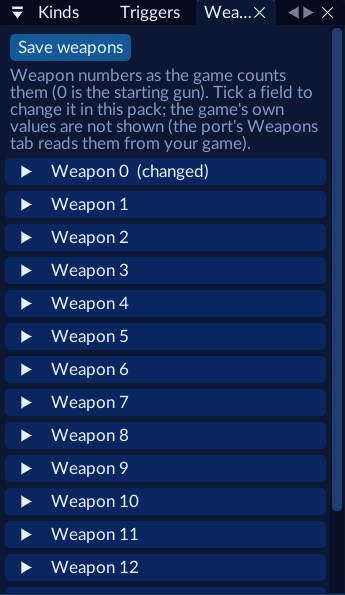
Change three fields
Open Weapon 0 and tick:
| Field | Value | Effect |
|---|---|---|
| damage | 12 | Each bolt hits harder |
| delay | 6 | Fewer frames between shots: faster fire |
| lifetime | 40 | Bolts live longer: more range |
The section title gets “(changed)”.
Save and play
Save weapons (or Ctrl+S), then Play. Fire away.
The player’s own F9 Weapons tab wins over a pack: if they ticked “Modify” for the pistol there, they see their values, not yours.
Which numbers to try
| Field | Range | Notes |
|---|---|---|
| damage | 0–255 | 0 hits for nothing |
| delay | 0–255 | Frames at 30 fps between shots |
| throw_delay | 1–127 | Thrown weapons only |
| lifetime | 1–255 | Laser bolts live lifetime × 6 frames |
| spread_x, spread_y | 0–8192 | 65536 is a full turn; 0 is dead accurate |
| speed | 0.1–2000 | Projectile speed |
Not every weapon uses every field: see the table on Weapons API.
The same in Lua
Studio turns the Weapons window into a script for you. Written by hand it’s:
jfg.weapon(0, { damage = 12, delay = 6, lifetime = 40 })   -- the pistol
jfg.weapon(5, { spread_x = 0, spread_y = 0 })              -- a dead-accurate Tri-Rocket Launcher
Lua lets you change weapons as the game goes: say, a faster gun only in one level.
jfg.on("level", function(level)
  if level == jfg.level_id("level_landing") then
    jfg.weapon(0, { delay = 4 })
  else
    jfg.weapon(0, { delay = 8 })
  end
end)