A new enemy look
Make a red “Fire Ant” from the game’s BlueAnt: same model, animations and behaviour, your textures, its own type. The pack carries only your PNGs; the port builds the rest from each player’s own game.
Make the kind
Open Kinds and press New kind. Name it Fire Ant and pick the base type (search BlueAnt). Studio makes
kinds/fire_ant.json and an empty kinds/fire_ant/ folder.
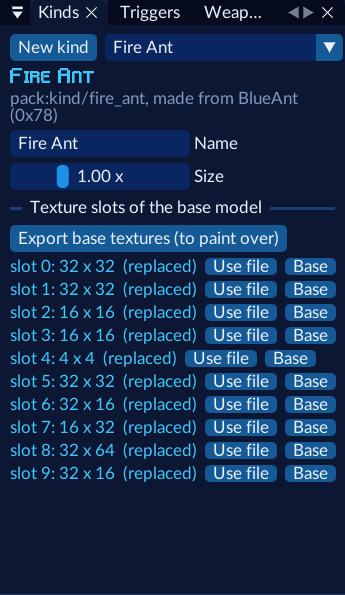
Export the textures to paint over
Press Export base textures (to paint over). Each texture slot of the base model is written as
kinds/fire_ant/<slot>.png, at its own size.
Those exports come from your ROM. Paint over them for your own work, but ship only images you made: start fresh in the same size, or repaint them fully.
Paint
Edit the PNGs in any paint program. Keep each image the same size as its slot (the window lists the sizes: 32 × 32, 16 × 16…). Small textures read best with strong, simple patterns.
Use your files
For each slot, press Use file. The slot now says “replaced”. Base goes back to the game’s texture for that slot. Set Size if you want bigger or smaller ants (1.00 is the base’s).
Place them
The kind is in Prefabs › Pack kinds. To make a whole squad spawn Fire Ants, place a squad (Groups › Squad, region
and locked door with BlueAnts) and tell its squadron to use the kind: in the squadron’s entry in
levels/<level>/objects.json, add
"kindFields": { "baddyType": "pack:kind/fire_ant" }The build writes the kind’s id and multiplies the squad’s size by the kind’s.
Play
Save, Play, and meet your ants.
There’s no Inspector field for kindFields yet, so for now that one line is a hand edit. The example world’s Ember
Caverns does exactly this.
What a kind can’t do yet
- New meshes or animations: a kind is always its base’s model.
- New behaviour: it acts like its base (squads treat it as one).
- Both are planned.